Klaviyo Google Sheets Integration: Two-Way Sync, Not Just Export
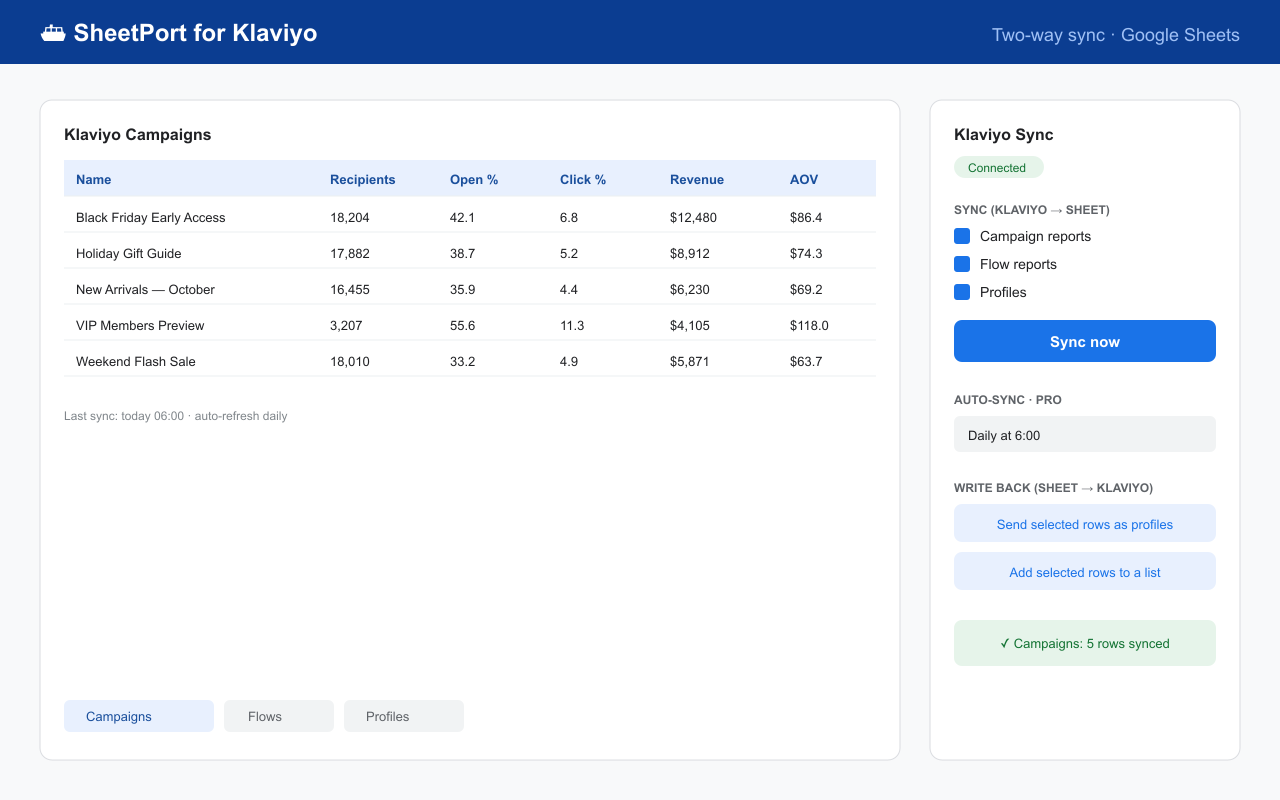
SheetPort for Klaviyo is a Google Sheets™ add-on that connects Klaviyo and Google Sheets both ways: it pulls campaign reports, flow performance and profiles into your spreadsheet on a schedule, and pushes your edits back to Klaviyo.
Install free from Google Workspace™ Marketplace
What the integration syncs
| Direction | Data | Details |
|---|---|---|
| Klaviyo → Sheets | Campaign reports | Recipients, open rate, click rate, conversions, revenue, AOV — one row per campaign. |
| Flow performance | The same metrics for every flow in your account. | |
| Profiles & lists | Email, name, phone, location, created date. Lists with 10,000+ profiles sync in chunks and resume automatically. | |
| Sheets → Klaviyo | Profile upsert | Edit rows in the sheet and push them back as Klaviyo profiles — extra columns become custom properties. |
| Add to list | Select rows and subscribe them to any Klaviyo list. |
How it works (about 30 seconds)
- Install the add-on from the Google Workspace™ Marketplace — free, no credit card.
- Connect with a scoped API key: in Klaviyo, go to Settings → Account → API keys, create a Private API key with read scopes, and paste it into the SheetPort sidebar.
- Pick your data and sync: campaign reports, flow reports and profiles each land in their own tab, ready for formulas, charts and pivot tables.
Full setup details are in the docs. On the Pro plan ($19/month), syncs also run automatically on a daily or hourly schedule — see building auto-refreshing Klaviyo reports.
Why two-way sync matters
Most ways of getting Klaviyo data into a spreadsheet are one-way exports: the data arrives, goes stale, and any edits you make stay trapped in the sheet. A true integration works in both directions.
With SheetPort, the spreadsheet becomes a control panel. Clean up customer properties in bulk, prepare a list of VIPs with formulas, then push the rows back to Klaviyo as profile updates or list additions — no CSV import wizard, no re-mapping columns every time.
How it compares to other approaches
| Manual CSV export | Custom Apps Script / API | SheetPort add-on | |
|---|---|---|---|
| Setup time | None, but repeated every time | Hours to days | ~30 seconds |
| Scheduled refresh | No — manual each time | Yes, if you build and maintain it | Yes (Pro) |
| Campaign & flow metrics | Partial, per-export | Yes, but rate limits and pagination are on you | Yes, handled automatically |
| Write data back to Klaviyo | Only via CSV import wizard | Yes, if you build it | Yes (Pro) — upsert profiles, add to lists |
| Maintenance | Your time, forever | Yours when the API changes | Ours |
Deeper dives: how to export Klaviyo to Google Sheets (all 3 methods) and why teams replace manual CSV exports.
Security and privacy
Your Klaviyo data flows directly between Klaviyo and your Google Sheet, inside your Google account. SheetPort's servers never receive, store or see your Klaviyo data or your API key — the backend only stores license keys and anonymous usage counters. See the Privacy Policy.
Pricing
Free — manual sync of all reports and data types, no credit card required. Pro ($19/month) — scheduled auto-sync (daily/hourly) and write-back to Klaviyo. Details on the pricing page, common questions in the FAQ.
Google Workspace™ Marketplace · Free plan · No credit card required
SheetPort is an independent product and is not affiliated with or endorsed by Klaviyo. Klaviyo is a trademark of Klaviyo, Inc. Questions: [email protected]