SheetPort for Klaviyo — Docs
From install to your first synced sheet in about 30 seconds. No IT project, no CSV exports.
Quick start
- Install the add-on from the Google Workspace™ Marketplace (free, no credit card).
- Open the sidebar: in any Google Sheet go to Extensions → SheetPort for Klaviyo → Open.
- Create a Klaviyo API key: in Klaviyo go to Settings → Account → API keys → Create Private API Key. Grant read access to
Campaigns,Flows,Metrics,Lists,Profiles(add write access toProfilesandListsif you plan to use write-back). - Paste the key into the sidebar and click Connect.
- Pick your data (campaign reports, flow reports, profiles) and hit Sync now. Each dataset lands in its own tab.
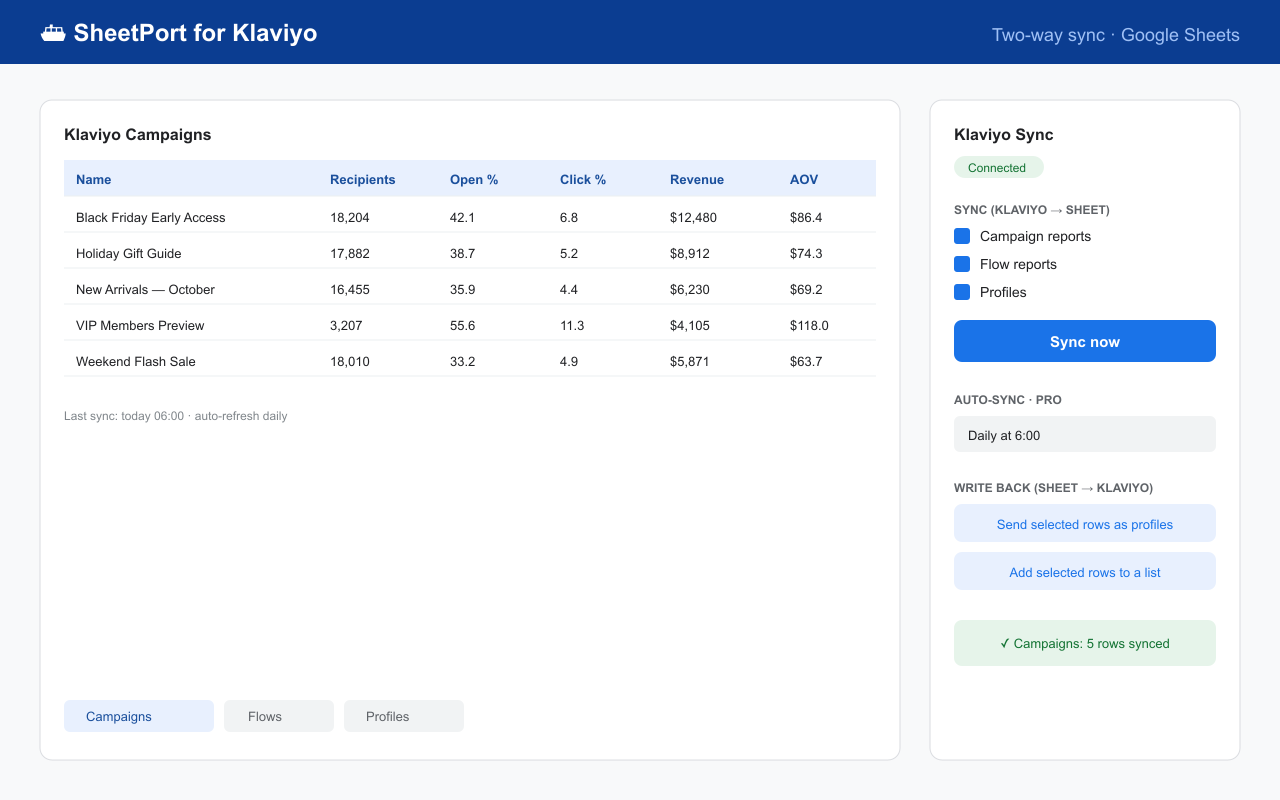
What lands in your sheet
| Tab | Contents |
|---|---|
| Klaviyo Campaigns | Recipients, open rate, click rate, conversions, revenue, AOV — one row per campaign. |
| Klaviyo Flows | The same performance metrics for every flow. |
| Klaviyo Profiles | Full profile list: email, name, phone, location, created date. Large lists welcome — 10,000+ profiles sync in chunks automatically and resume if interrupted. |
Your formulas, charts and pivot tables live in other tabs and survive every refresh — SheetPort only rewrites its own data tabs.
Pro features ($19/month)
Scheduled auto-sync
Set the sidebar to refresh daily or hourly. Monday-morning reports build themselves.
Write-back (Sheets → Klaviyo)
Select rows in your sheet and: upsert them as profiles (extra columns become custom properties) or add them to any list. The sheet becomes a control panel, not just a report.
Where your data goes (and doesn't)
Your Klaviyo data flows directly between Klaviyo and your Google Sheet, inside your Google account. Our servers never receive, store or see your Klaviyo data or your API key. The only things SheetPort's backend stores are license keys and anonymous usage counters. We never use your data to train AI models. Details in the Privacy Policy.
FAQ & troubleshooting
The sync seems slow or stuck
Klaviyo's reporting API is heavily rate-limited (their limit, not ours) — a full report sync can take a couple of minutes while SheetPort waits politely between requests. Very large profile lists sync in chunks and continue automatically until done. Leave the sheet open; it will finish.
I get "PRO_REQUIRED" when using auto-sync or write-back
Those two features are Pro. Upgrade on the pricing page, then paste your license key into the sidebar's License field.
"Invalid API key" when connecting
Make sure you created a Private API key (starts with pk_) and granted the scopes listed in Quick start. Public keys and keys with no scopes can't read your account.
The sidebar doesn't appear under Extensions
Refresh the browser tab after installing. If it still doesn't show, your Workspace admin may need to approve the add-on for your domain.
Can I sync multiple Klaviyo accounts?
Yes — use one spreadsheet per account. Each spreadsheet keeps its own connection and settings.
How do I disconnect or delete my data?
Click Disconnect in the sidebar — your API key is deleted immediately from the add-on's storage. Your synced sheets are yours; keep or delete them as you like.
Still stuck? Email [email protected] — a human (well, mostly) replies fast.